Pixel Art Halloween Icons Set Review
As a designer who spends more time looking at stitch density charts than actual pixel grids, I approach digital assets with a healthy dose of skepticism. The market is flooded with "cute" clip art that looks charming on a screen but falls apart when pushed through an embroidery machine needle. However, when I first pulled the Pixel Art Halloween Icons Set from its ZIP folder, I felt a genuine spark of interest. It isn’t just another generic holiday graphic; it feels like a deliberate design choice for makers who want to bridge the gap between retro gaming nostalgia and modern handmade aesthetics.
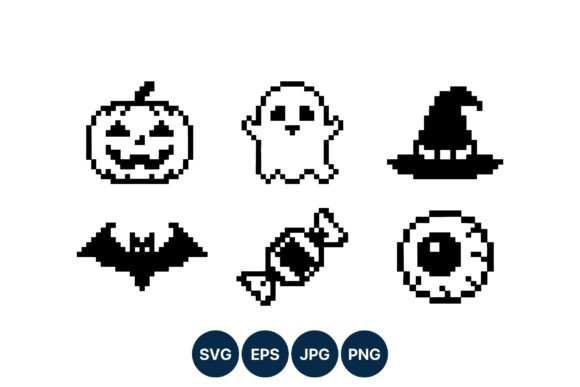
The set features six distinct icons: a pumpkin, ghost, witch hat, bat, candy, and eyeball. Rendered in a strict black-and-white 8-bit style, these graphics offer a clean, high-contrast visual personality that translates exceptionally well into thread. For those of us building brands around custom apparel, boutique accessories, or digital product previews, this set offers a versatile toolkit that feels both playful and professional.
First Impressions and Visual Personality
The immediate appeal of the Pixel Art Halloween Icons Set lies in its simplicity. In a sea of overly detailed, multi-colored vector illustrations, the monochromatic palette stands out. It creates a mood that is instantly recognizable yet understated. The shapes are blocky and intentional, evoking the early days of video games without feeling dated. This retro vibe pairs beautifully with contemporary trends in streetwear, minimalist nursery decor, and tech-inspired craft business branding.
From a design perspective, the layout is intuitive. You get a cohesive family of images that can be used individually or as a repeating pattern. The visual weight of each icon—whether it’s the floating ghost or the jagged bat wings—is balanced enough to work on small items like embroidered patches or large enough to anchor a chest print on a sweatshirt. It doesn’t scream for attention; rather, it invites the viewer to appreciate the craftsmanship behind the digitization.
Real-World Application: From Screen to Stitch
I recently evaluated this asset while preparing a batch of custom embroidered tote bags for a local pop-up shop. The client wanted something spooky but not scary, suitable for teenagers and young adults. The Pixel Art Halloween Icons Set was the perfect solution. Instead of trying to force a complex illustration onto canvas, I selected the pumpkin and candy icons. The result was crisp, legible, and undeniably cool.
This type of machine embroidery design shines in specific scenarios:
- Custom Apparel: On t-shirts and hoodies, the blocky lines create a bold graphic look. The contrast ensures the design pops even on dark fabrics if you use white or metallic threads.
- Baby Embroidery: The simplified shapes are gentle and clear, making them ideal for onesies or burp cloths where intricate details might get lost or feel too aggressive.
- Holiday Embroidery: Whether for kitchen towels, pillow covers, or aprons, these icons add a festive touch without overwhelming the textile’s texture.
- Etsy Seller Assets: For digital product sellers, these files serve as excellent source material for printable mockups. The clean lines reproduce well in low-resolution thumbnails, which is crucial for online listings.
I also tested the bat and ghost icons as standalone elements for personalized gifts. When stitched onto denim caps or leather patches, the 8-bit aesthetic gives the finished product a unique character that feels curated rather than mass-produced. It elevates a simple handmade product into a statement piece.
Technical Performance and Stitch Clarity
When evaluating any embroidery file, clarity is king. The pixel art format naturally lends itself to clean edges. Because the designs are based on grid-aligned blocks, they translate smoothly into satin stitches or fill stitches depending on the digitizer’s interpretation. There is no ambiguity in the shape, which reduces the risk of thread breaks or puckering caused by overly complex curves.
However, the effectiveness of the Pixel Art Halloween Icons Set depends heavily on your execution. The high-contrast nature means that thread color selection is critical. A black-on-black design will disappear, while a white-on-navy design will sing. I recommend testing various thread colors to see how the light reflects off the satin finish. Sometimes, using a slightly textured thread can enhance the retro feel, mimicking the roughness of old arcade screens.
For best results, pay close attention to the stitch density. While the shapes are simple, filling large solid blocks (like the body of the pumpkin) requires adequate underlay and top-stitching to prevent fabric show-through. If you are working with thin fabric or stretchy materials, ensure you are using the proper stabilizer to keep the hoops stable and the pixels sharp.
Where to Use Carefully
While this set is versatile, it is not a one-size-fits-all solution. There are specific contexts where you should exercise caution:
- Small Hoop Sizes: At very small scales (under 2 inches), the individual pixels may merge together, losing their distinct character. Ensure your hoop size allows for enough resolution to maintain the 8-bit integrity.
- Textured Fabrics: Rough weaves, chenille, or heavy bouclé can obscure the clean lines of the pixel art. Smooth cottons, linens, and synthetics provide the best canvas for this style.
- Curved Surfaces: Applying flat pixel art to curved surfaces like baseball caps can distort the grid. Digitize with appropriate curvature adjustments or place the design on flat panels.
- Dense Stitch Areas: Avoid placing these icons directly next to other dense embroidery without sufficient spacing. The stark black-and-white contrast can become visually jarring if competing with heavy floral fills or script lettering.
Impact on Brand and Customer Trust
In the world of craft business and small shop products, presentation is everything. Using a coherent, well-executed design system like the Pixel Art Halloween Icons Set signals professionalism. It shows customers that you care about consistency and quality. When a buyer sees a matching set of icons on a tote bag, a keychain, and a sticker, it builds brand recognition and trust.
Furthermore, the nostalgic theme taps into emotional connections. Customers don’t just buy a finished product; they buy the feeling of childhood wonder mixed with modern style. This emotional resonance drives engagement and encourages social sharing. A well-stitched pixel bat on a hoodie is likely to be photographed and posted, providing free marketing for your commercial embroidery venture.
Practical Designer Notes
Before incorporating these assets into your workflow, consider the following practical steps:
- Test on Scrap Fabric: Always run a test stitch-out to check for tension issues and thread breakage.
- Review File Formats: The download includes SVG, PNG, JPG, and EP formats. Ensure you are using the correct format for your digitizing software or direct-to-garment needs.
- Check Licensing: Verify the terms of use before selling finished items. Some licenses allow commercial use for limited quantities, while others require extended rights for digital product sellers.
- Mockup Testing: Create black-and-white mockups to visualize the design on different backgrounds. This helps you decide whether to invert colors or adjust thread choices.
- Inspect Small Details: Zoom in on the original graphics to ensure no fine details were lost during compression. Tiny pixels can sometimes blur if the source file is low resolution.
The Pixel Art Halloween Icons Set is more than just a collection of cute images; it is a strategic design asset for serious makers. By understanding its strengths and limitations, you can create custom apparel and personalized gifts that stand out in a crowded marketplace. It bridges the gap between digital creativity and tactile craftsmanship, offering a fresh take on classic Halloween themes. If you are looking to add a touch of retro charm to your embroidery project lineup, this set is a worthy addition to your library of design assets.